Simulator Environment for CS5222 Homework 3
| (1) |
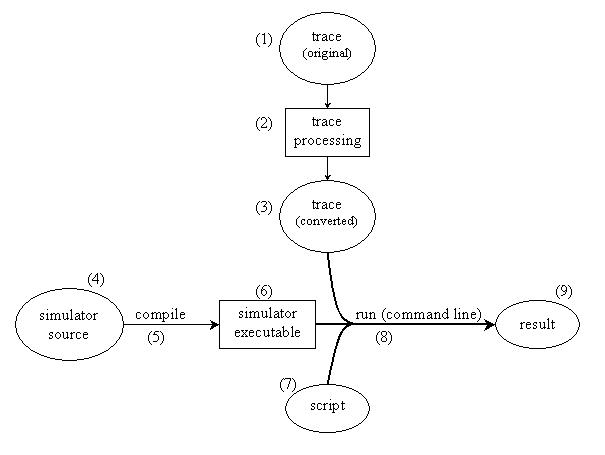
There are many web traces available on the internet. Please click here for a collection of web traces. Different traces have different format. Please refer to their respective README file for details. A sample trace is included here. The trace is from NLANR. Download the trace here:
We have put one Digital and one Berkeley trace here. (18/11/2003) |
| (2) |
You should write small programs to convert the original traces from their original formats to the format required by our simulator (please see (3) for details). More information on the conversion can be found here. The "converter" program for converting the sample trace is provided here: |
| (3) |
The format required by our simulator is as follows:
The converted sample traces are here:
|
| (4) |
The source code is written in C. Please click the following links to download the source code. README files are included. |
| (5) |
To compile the source code is very easy: just go to the "src" directory and type "make". Of course, you need to do this on a UNIX or LINUX machine. |
| (6) |
A sample version of executable is available here. It is compiled on SunFire, the OS is SunOS 5.8. |
| (7) |
A "script" file is used to tell the simulator what caching algorithms to use and what the parameters are. A sample "script" file is available below. Please refer to this file for its format. The meanings of the parameters used in this file can be found here. |
| (8) |
Type the executable's name and parameters in the command line to start the simulation. For more help information, you may use the command-line parameter "-h". |
| (9) |
Result will be put to a file or on screen according to your command-line parameter. Here is a sample result file: zip package, tar package |
The sample traces given should be used in the homework. Of course, you are encouraged to use other traces which are available on the Interent. The URLs and links are given here.