Release 8.1.7
Part Number A85257-01
 Library |
 Product |
 Contents |
|
Oracle Objects for OLE Release 8.1.7 Part Number A85257-01 |
|
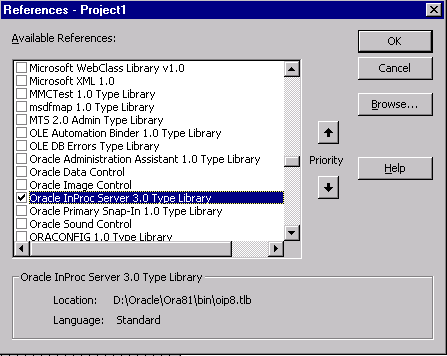 2. Start Visual Basic and create a new project, then add the following code to
the Declarations section of a form.
...
' Declare variables
Dim OraSession As OraSession
Dim OraDatabase As OraDatabase
Dim OraDynaset As OraDynaset
Dim OraFields As OraFields
3. Add the following code to the Load procedure associated with the form to
display the Oracle data.
' Create the OraSession Object. The argument to CreateObject is the
' name by which theOraSession object is known to the OLE system.
Set OraSession = CreateObject("OracleInProcServer.XOraSession")
' Create the OraDatabase Object by opening a
' connection to Oracle.
Set OraDatabase = OraSession.OpenDatabase("ExampleDb", "scott/tiger", 0&)
' Create the OraDynaset Object.
Set OraDynaset = OraDatabase.CreateDynaset("select * from emp", 0&)
' You can now display or manipulate the data in the
' dynaset. For example:
Set OraFields = OraDynaset.fields
OraDynaset.movefirst
Do While Not OraDynaset.EOF
MsgBox OraFields("ename").Value
OraDynaset.movenext
Loop
End Sub
4. Run the form to view the results.
See Quick Tour with Visual Basic for more information on using OO4O with Visual Basic.
See Also
2. Start Visual Basic and create a new project, then add the following code to
the Declarations section of a form.
...
' Declare variables
Dim OraSession As OraSession
Dim OraDatabase As OraDatabase
Dim OraDynaset As OraDynaset
Dim OraFields As OraFields
3. Add the following code to the Load procedure associated with the form to
display the Oracle data.
' Create the OraSession Object. The argument to CreateObject is the
' name by which theOraSession object is known to the OLE system.
Set OraSession = CreateObject("OracleInProcServer.XOraSession")
' Create the OraDatabase Object by opening a
' connection to Oracle.
Set OraDatabase = OraSession.OpenDatabase("ExampleDb", "scott/tiger", 0&)
' Create the OraDynaset Object.
Set OraDynaset = OraDatabase.CreateDynaset("select * from emp", 0&)
' You can now display or manipulate the data in the
' dynaset. For example:
Set OraFields = OraDynaset.fields
OraDynaset.movefirst
Do While Not OraDynaset.EOF
MsgBox OraFields("ename").Value
OraDynaset.movenext
Loop
End Sub
4. Run the form to view the results.
See Quick Tour with Visual Basic for more information on using OO4O with Visual Basic.
See Also
 Copyright copy; 1996-2000, Oracle Corporation. All Rights Reserved. |
|