Background
Autism Resource Centre (ARC) is a charity dedicated to serving children and adults with Autism Spectrum Disorder (ASD), helping them lead meaningful and independent lives in society. ARC is best known for establishing Pathlight School, but it also runs a programme that equips adults with autism with employability skills through training, before placing them in suitable jobs with appropriate on-job support.
The programme currently supports 200+ active clients working across 47 worksites. In 2026, CVWO partnered with ARC to build Job Support Central (JSC), a system to support the on-job support phase of this programme.
Status Quo
When a client joins the programme, they go through three stages:
- Evaluation: to determine the nature of their condition and the types of employment suitable for them
- Training: based on the type of employment identified as suitable
- Work: placement at a suitable job, together with on-job support
Multiple clients can work at the same worksite, and every job coach is assigned to a number of worksites to provide this on-job support. This involves weekly or monthly in-person visits to check in on clients and gather feedback from their supervisors, as well as interventions whenever a client runs into an issue.
This support is critical to maximising job retention. In fact, there have been real cases where clients lost their jobs because workplace issues were not identified and addressed early enough.
The Problem
For each client, the Government’s grant only finances 1 year of support. This leaves ARC with two unappealing options: stop providing on-job support after a client’s first year, or continuously increase each job coach’s workload as more clients join the programme. Neither option is ideal: the first neglects clients who still need support, and the second is unsustainable as the programme grows.
The Solution
ARC’s insight was that if coaches could get a sense of which clients were currently at risk without having to manually check in on all of them, each coach would be able to support more clients with the same amount of time. JSC was built around this idea: a system that flags clients who are currently at risk, so that coaches can focus their limited time on the clients who need it most.
Key Contributions
Risk Index
To estimate each client’s risk level at a given point in time, we built a risk index, derived from two key beliefs held by ARC:
- How tired, frustrated, anxious, or sad a client feels at the end of the workday indicates their emotional state, and therefore the risk of them running into an issue at work
- Everyone has bad days now and then, so the risk index should be calculated from a client’s emotional state over the last 7 days rather than just the previous day, so that one-off anomalies don’t trigger false alarms
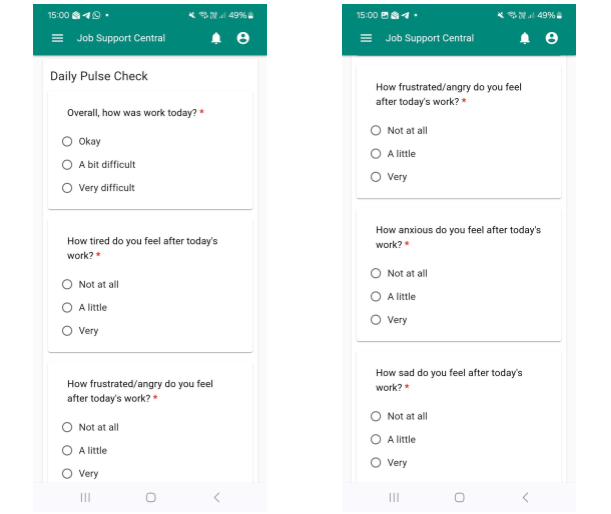
This meant we needed an easy way for clients to self-report their daily emotional state, as well as a way to remind them to do so. We built a daily pulse check form for clients to fill up, along with push notifications sent after working hours to remind them to submit it. Each submission is scored, and a client’s risk index is the sum of these scores over the previous 7 days.
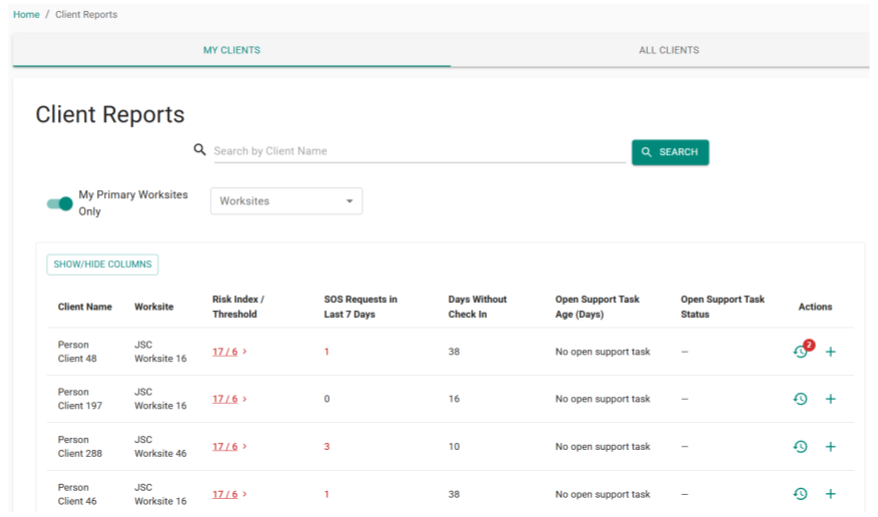
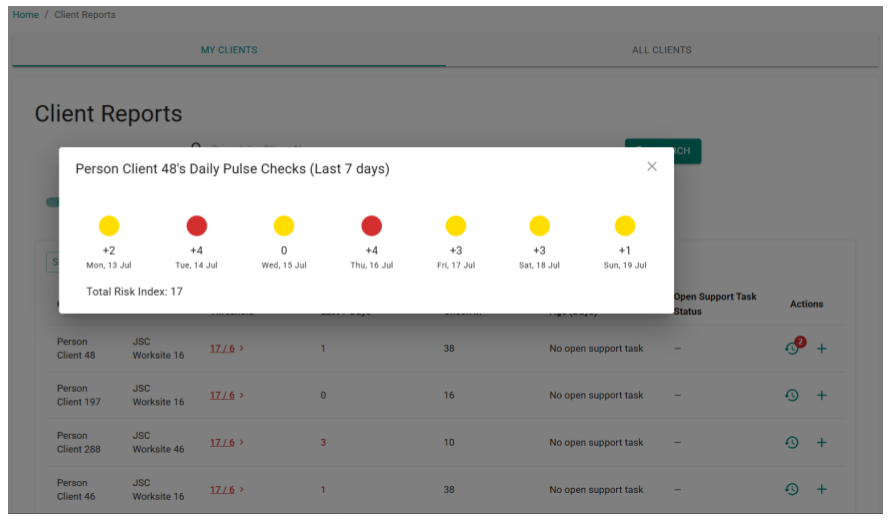
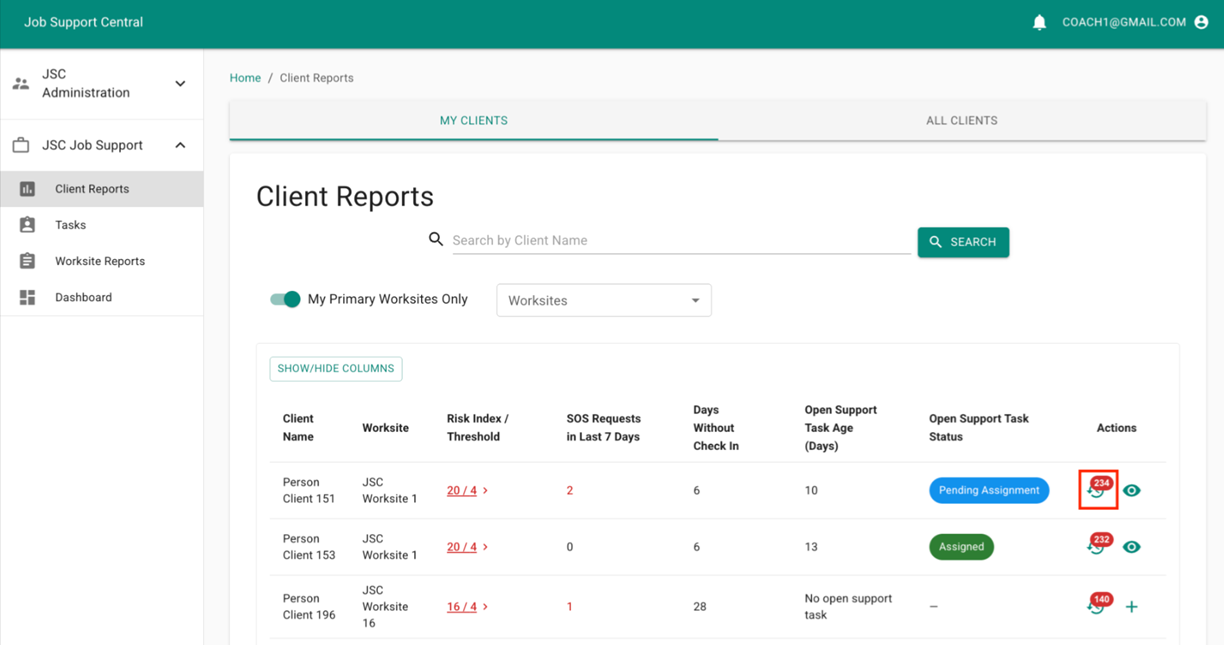
Coaches see each client’s current risk index and configured threshold on the Client Reports page, the first page they see after logging in. Risk indices exceeding the threshold are highlighted in red, and clicking on a client’s risk index opens a breakdown dialog showing how it was computed from the last 7 days of submissions.
Multi-Source Reporting
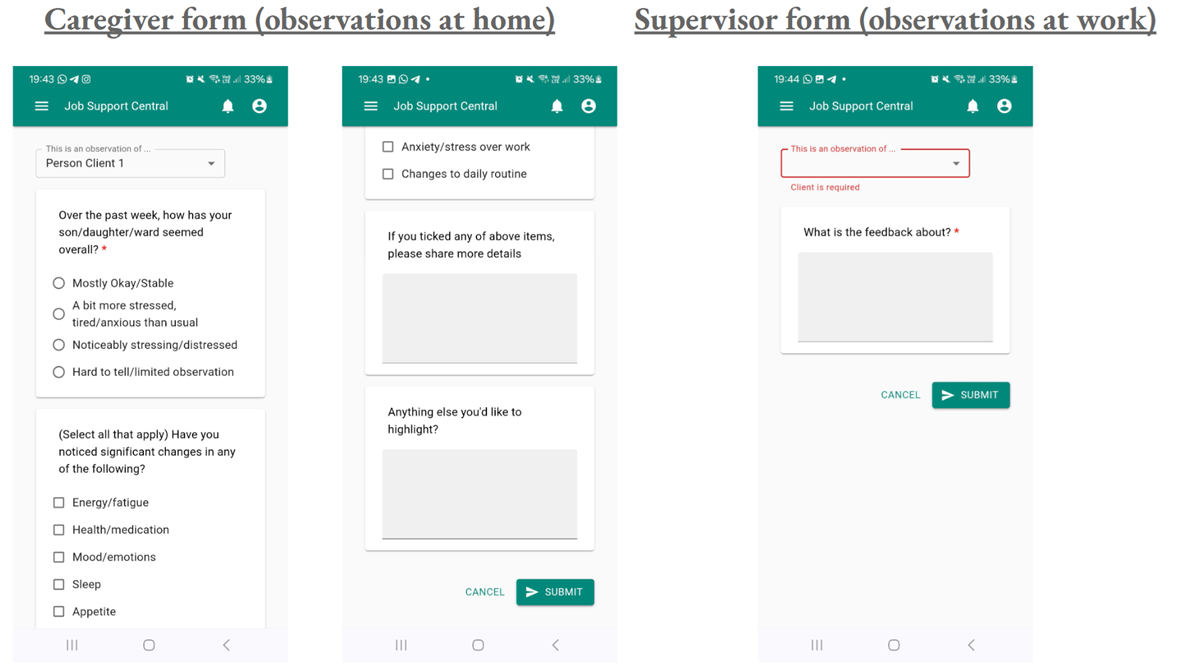
Besides collecting self-reports from clients, we also built a caregiver form for observations at home and a supervisor form for observations at work. Collecting information from three independent sources, the client, their caregiver, and their supervisor, makes it more likely that a genuine issue is caught, since consistent signals across sources are more reliable than any single one.
Coach Workflow and Support Tasks
On the Client Reports page, coaches can see which clients currently have a risk index exceeding their threshold, as well as how many submissions from clients, caregivers, or supervisors they have yet to read for each client, shown as a notification bubble.
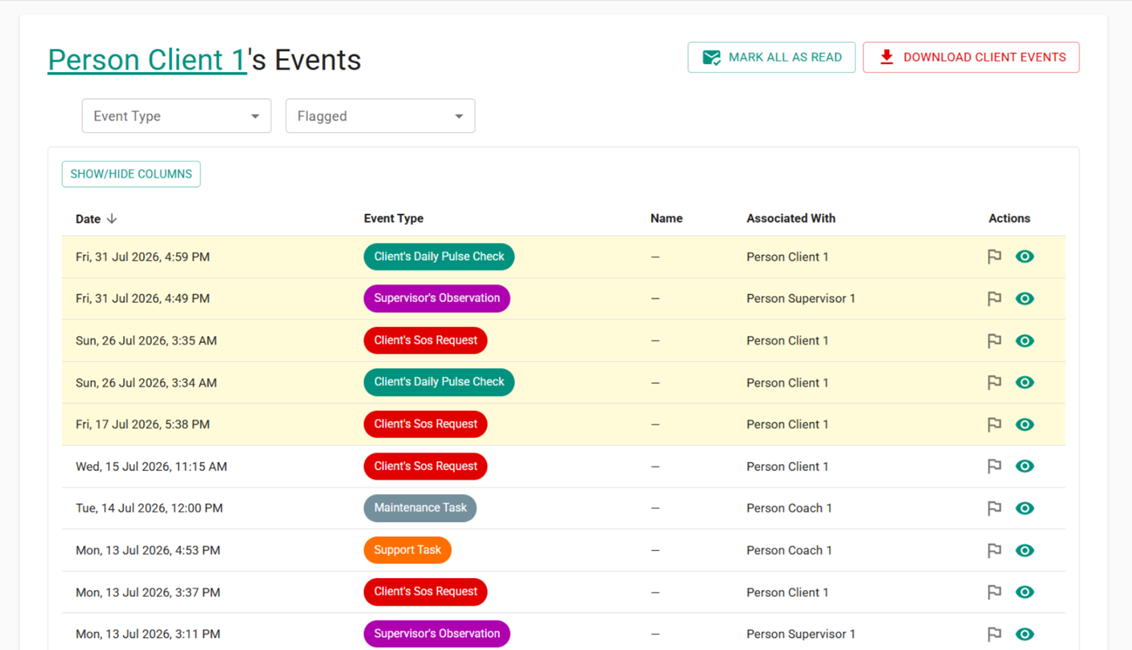
Clicking on the clock icon takes the coach to the Client Events page, where they can view each submission.
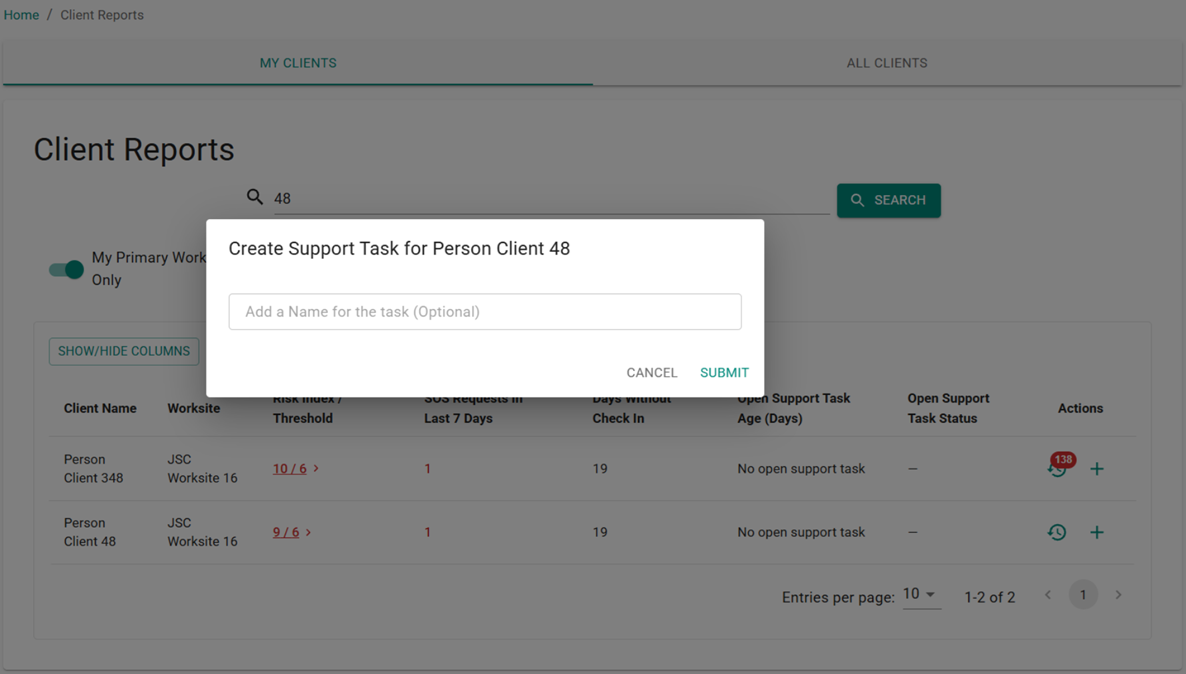
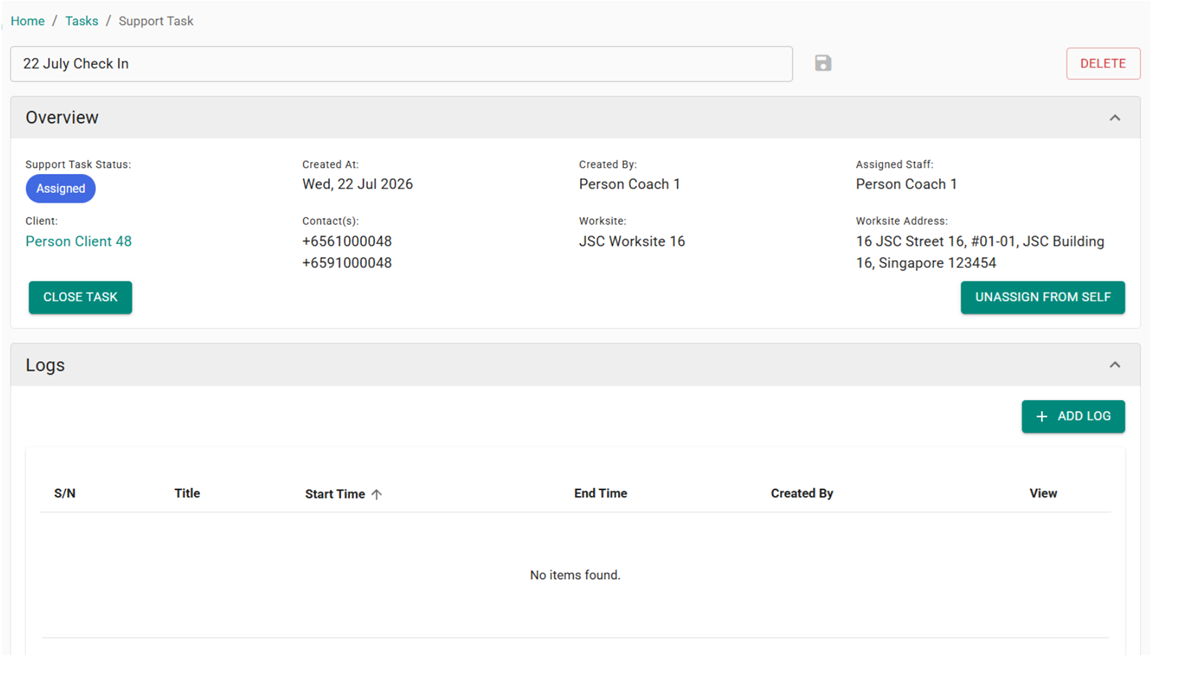
After reviewing a client’s recent submissions, if a coach decides that a check-in is warranted, they can create a Support Task for that client to track it in the system, optionally naming it for easier identification.
Coaches can then add logs to the task to record the actions taken and interactions with the client and other stakeholders.
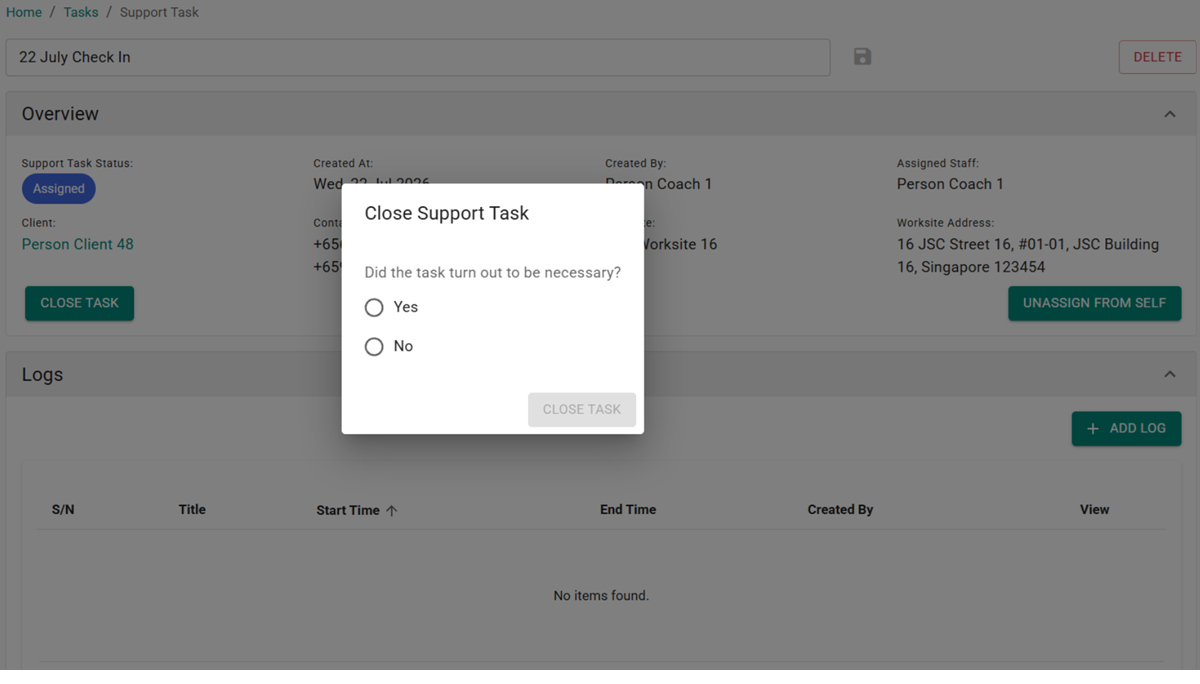
Once the issue is resolved, or it turns out the client was fine and didn’t need help, the coach can close the task. Closing a task prompts the coach with a simple question: knowing what they know now, was it actually necessary to check in with this client? We ask this so that, once enough data has been collected, we can eventually train a classification model to predict whether a client needs a check-in based on recent form submissions and their check-in history.
Maintenance Tasks
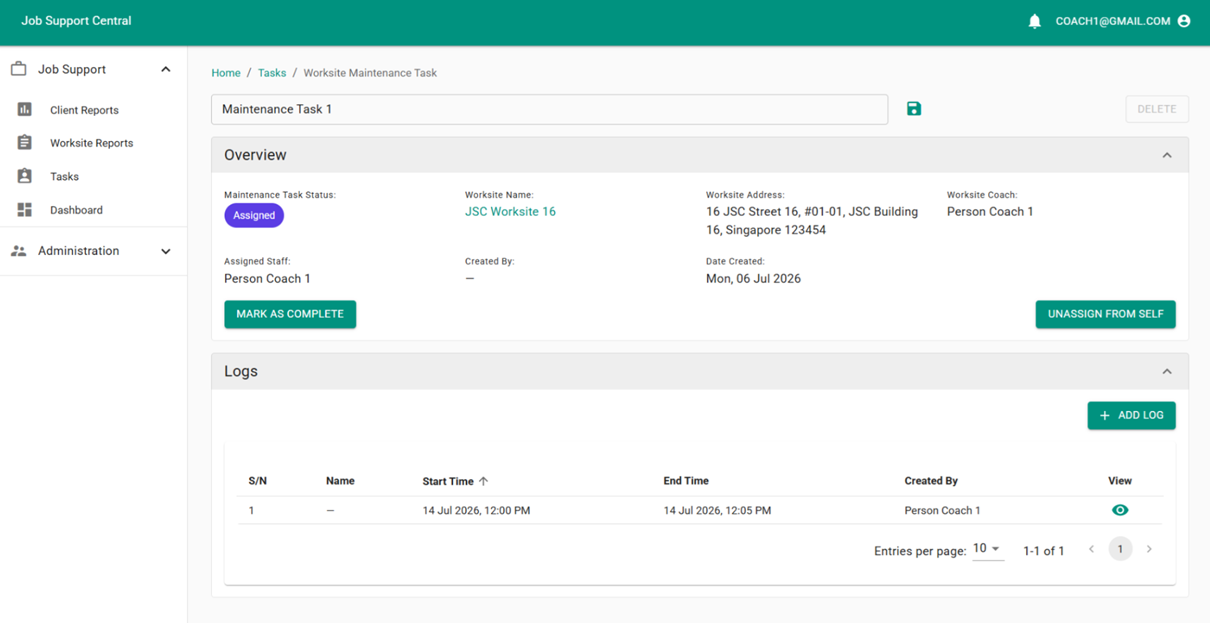
A risk index built from self-reports only works if a client keeps submitting them. To make sure no client is neglected simply because their risk index stays low, the system automatically flags clients who have not had a check-in within the last 90 days.
This is handled by a daily cron job that finds worksites with clients whose last check-in was 90 or more days ago, creates a Maintenance Task for each of these worksites, and emails a notification to that worksite’s coaches. A Maintenance Task tracks a coach’s visit to check in on everyone at a worksite. Once the visit is done, the coach writes up their report and marks the task as complete.
Team Lead Dashboard
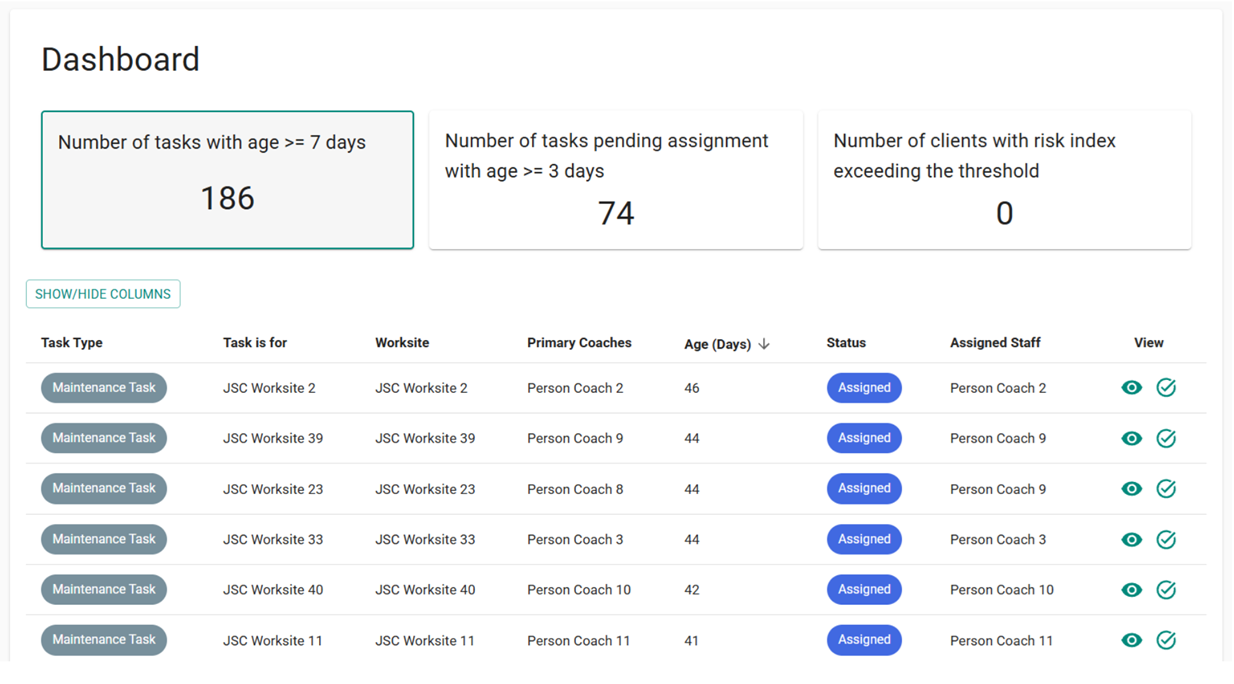
To give team leads visibility across all coaches and worksites, we also built a dashboard summarising the state of clients, support tasks, and maintenance tasks under their oversight.
Native App vs PWA
Since JSC relies on push notifications to remind clients to submit their daily pulse check, an important early decision was whether to build a native app or a Progressive Web App (PWA).
A native app guarantees that push notifications are always sent immediately, even when the device is locked or on low battery. A PWA’s push notifications, on the other hand, may be delayed until the device’s service worker wakes up to process and display them. This means that a notification sent at 10pm might not arrive until 10:05pm. However, a PWA is just a web app with a special viewport, letting us reuse our existing infrastructure, and changes can be deployed to production without waiting for App Store review.
As CVWO only has 3 months a year for development, ease of development and long-term maintenance was more important to us than guaranteeing that push notifications always arrive immediately, so we chose to build JSC as a PWA.
Building JSC as an installed PWA did introduce a deployment problem we hadn’t faced before. Previously, users accessed our other existing apps through a browser, which automatically discards idle tabs after a period of inactivity, so the next time a tab is opened, it reloads and picks up the latest deployment. Installed PWAs, however, are treated like real apps by the operating system: the cached deployment continues to be used until the user manually closes the app in the background, which meant some users could be stuck on a stale frontend for days without realising it.
To fix this, we added a version.json file to each frontend build at build time, containing the time the build was made. Whenever a user switches back to the app, the frontend fetches the latest version.json from the server, and if the version has changed, it reloads the page and bypasses the cache to pick up the latest deployment.
Project Team

- Lek Wing Chung, Eugene (Project Lead, Year 2)
- Muhammad Nur Adzfar bin Mohammad Zulkiffli (Developer, Year 1)
- Chen Fanggege (Developer, Year 1)
- Wang Jiahua (Developer, Year 1)
- Goh Min Rui (Developer, Year 1)
- Yu Tianle (Developer, Year 1)
Afterthoughts
Leading this project was a humbling experience. Translating a real operational problem into something coaches would actually want to use taught me far more than any classroom ever could. I’m proud of what our team built this summer.
– Eugene
CVWO showed me that the hardest bugs aren’t in the code, but in understanding what the people on the ground actually need. Working on a system that directly supports coaches and their clients made every late night worth it.
– Adzfar
This was my first time building something that real people would rely on every day, and that responsibility changed how I think about writing code. I’m thankful for the guidance from my teammates and mentors along the way.
– Chen Fanggege
CVWO taught me that good software isn’t just about elegant code. It’s about earning the trust of the people who use it. I’m grateful for the chance to contribute to a cause this meaningful.
– Wang Jiahua
I came into CVWO expecting just to write code, but I left having learned how to listen to a client, ask the right questions, and turn vague requirements into something concrete. Grateful for a team that made the summer both challenging and fun.
– Goh Min Rui
Working on JSC was a reminder that technology, when built thoughtfully, can genuinely lighten the load for people doing difficult, important work. I’m grateful for the teammates who made this summer such a rewarding one.
– Yu Tianle
Acknowledgements
We would like to express our heartfelt gratitude to the following individuals and organisations for their invaluable support and influence throughout our project:
- GIC for their generous support
- Prof. Ben Leong (NUS) for his guidance and mentorship