Assignments
Learning Objectives
At the end of this sub-unit, students should
- understand how assignment works.
- know how to assign values to variables in different ways.
Basic of Assignment
There are at least four different kinds of assignments. However, we will only discuss two of them while keeping the rest as optional knowledge. An assignment is different from expression. The operations from the previous units are called expressions. Their evaluation produces a value.
On the other hand, an assignment is what we call a statement. The evaluation of a statement does not produce a value but may modify the state of the program. By the state of the program, we meant the mapping from variable to values.
Simple Assignment
The first one is a simple assignment.
First note that we use = operator for an assignment and not equality check since we use == for equality check.
We need to be careful not to confuse this with mathematical equality check.
Simple Assignment
The syntax of the simple assignment is shown below.
1 | |
Here, lhs is evaluated into an address and rhs is evaluated into a value.
For instance, lhs can be a variable name and rhs can be an expression that evaluates into a value.
Although an assignment is written as a single line, it actually consists of several steps. The evaluation is as follows.
- Evaluate
lhsto obtain an address \(A\). - Evaluate
rhsto obtain a value \(V\). - Store the value \(V\) into the address \(A\).
- If the variable does not exist, we will create the variable and the attached address.
Step 3 above has a conditional.
In particular, this will create a new variable if one does not exist yet.
If a variable does not exist and we try to retrieve the value, we will get a NameError.
There is no variable declaration in Python, which may make the code shorter but may also cause more confusion.
Since a variable stores a value that persists, we now have a stateful operation.
Simple Assignment
Since x does not exist yet, we will get an error.
1 2 | |
After assignment, the name will exist.
1 2 3 4 5 | |
The initial rhs can be any expression.
1 2 3 | |
With variable, we can now write more meaningful code. Below are some samples of our previous code rewritten with variable.
1 2 3 4 5 6 7 8 9 10 | |
1 2 3 4 5 6 7 8 9 10 | |
Re-Assignment
Recap how step 3 in the evaluation of an assignment has conditional. In particular, if the variable already exist, we simply retrieve the address. Then, we store the new value into this existing address. This means that the next time we ask for the value of this variable, it will have a different value1.
Additionally, the order of the operation means that there are certain code that may look mathematical but does not have a useful mathematical meaning.
x = x + 1
Consider the code x = x + 1.
Ask any mathematicians, they will be horrified by that statement because there is no value of x that can satisfy this.
However, this is a perfectly valid code.
1 2 3 4 5 6 | |
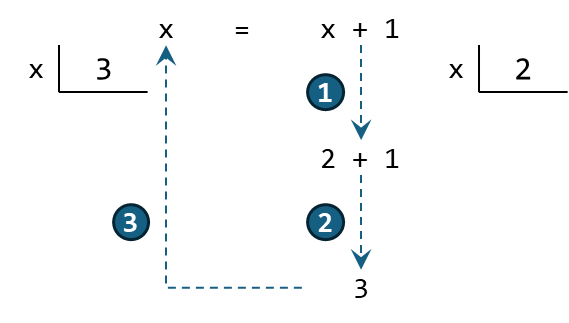
The order of operation is done as if we are evaluating rhs first (i.e., evaluate x + 1 into 1) before storing it in lhs.
Of course, the actual order is slightly different because we first evaluate lhs into an address.
But this does not change the value of x.
Note that from line 2 up to the rhs evaluation of line 4 (as highlighted above), the value of x is equal to 0 as indicated in x = 0.
The visualization below shows the steps starting from x = 2.
??? danger "Bad Practice"
Since the variable creation only happen in step 3, we may actually have problem when having the same variable name appearing in both lhs and rhs.
1 2 3 4 | |
Simultaneous Assignment
The second kind of assignment is called simultaneous assignment. In this kind of assignment, we can assign multiple variables simultaneously. It is particularly useful when we want to initialize several variables at the same time or to swap the values of variables.
Simultaneous Assignment
The syntax of the simple assignment is shown below.
1 | |
This syntax can be extended to an arbitrary number of lhs and rhs as long as there are equal number of both sides.
But note that by equal number, we do not simply count the number of variables because rhs can be any expressions.
The evaluation is also similar to simple assignment, but we simply expand this to the number of lhs and rhs.
- Evaluate
lhs1,lhs2, ... to obtain addresses \(A_1\), \(A_2\), .... - Evaluate
rhs1,rhs2, ... to obtain values \(V_1\), \(V_2\), .... - Store the value \(V_1\) into the address \(A_1\), \(V_2\) into the address \(A_2\), ....
- If any variable does not exist, we will create the variable and the attached address.
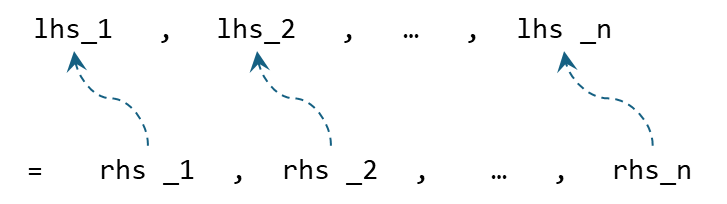
We recommend using this simultaneous assignment on two cases:
- Initializing multiple variables to initial their respective values.
- Swapping the values of variables.
Simultaneous Assignment
1 2 3 4 5 6 7 8 9 10 11 12 | |
??? idlerepl "Extra Variable Swap" Swapping can be done by adding one more variable to store temporary values. Using simultaneous assignment, we can rewrite this in a single line and with no extra variable.
1 2 3 4 5 6 7 8 9 10 11 12 13 14 15 16 17 18 19 20 21 22 23 | |
But what could be problem if we use it all the time? That looks similar enough to a simple assignment and we know how to evaluate simple assignment. Do read the bad practice below to know more, but the best advice is to simply do not use simultaneous assignment except for the two cases above.
??? danger "Bad Practice"
As usual, when thinking about the behavior in more details, there may be complications that exist.
First, note that all rhs1, rhs2, ... will be evaluated before creating any new variable.
So it can only use old variable.
Hence, the following will fail.
1 2 3 4 5 6 7 8 9 10 11 12 13 14 15 16 17 18 19 20 21 22 23 24 25 26 27 28 29 30 31 32 | |
Other Kinds of Assignment
??? question "Multiple Target Assignment"
Another kind of assignment has multiple lhs but only a single rhs.
1 2 3 4 5 6 7 8 9 10 11 12 13 14 15 16 17 18 19 20 21 | |
??? question "Augmented Assignment" Another kind of assignment combines assignment with operations.
1 2 3 4 5 6 7 8 9 10 11 12 13 14 15 16 17 18 19 20 21 22 23 24 25 26 27 28 29 30 31 32 33 34 35 36 37 38 39 40 41 42 43 44 45 46 47 48 49 50 51 52 53 54 55 56 57 58 59 60 61 | |
-
The use of the symbol
=inlhs = rhscan be thought of saying that thelhsis equal torhsbut only until the next assignment. ↩